AI analytics
The AI section shows how AI assistants and crawlers interact with your site: when ChatGPT, Claude, Gemini or Perplexity send you visitors, which crawlers index your pages, and which ones train on your content. Visits from AI chats are tracked automatically; crawler tracking needs a one-line middleware — this guide sets up both.
What the AI section shows
The card sits on your site dashboard, between the Goals card and the growth (MRR/ARR/Impressions) card, and has three tabs:
- 🤖 AI answers — people who clicked a link to your site inside an AI chat (“Clicks”), plus the user-triggered fetches behind them (“AI reads” — when ChatGPT-User or Claude-User opens a page to answer someone's question).
- 🔍 Indexing — autonomous crawlers that fetch your pages to index them for retrieval: OAI-SearchBot, Claude-SearchBot, PerplexityBot, Applebot and friends.
- 🧠 Training — crawlers that collect training data: GPTBot, ClaudeBot, Common Crawl's CCBot, Bytespider and others.
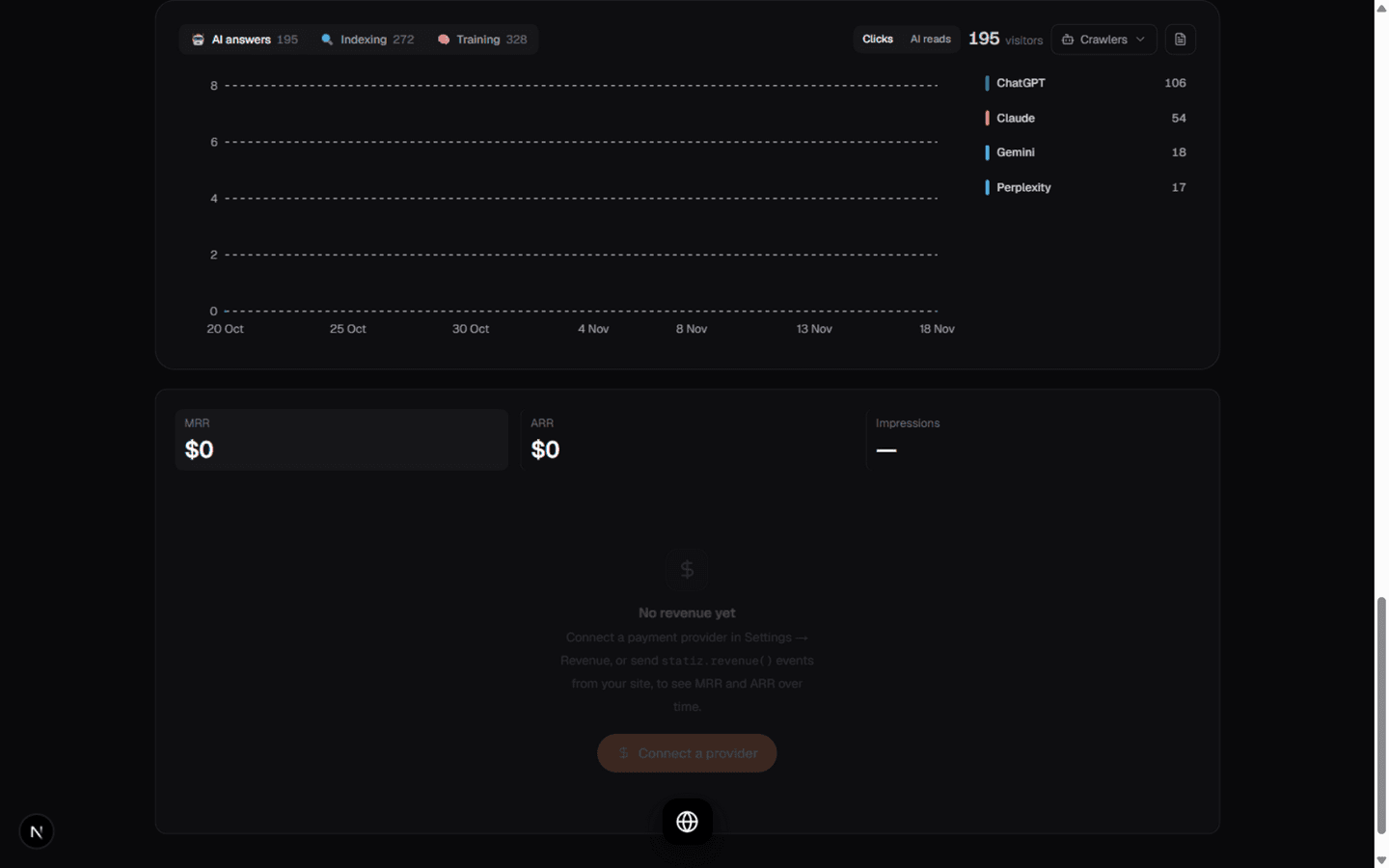
Each tab shows its total next to the label, a multi-line graph of activity over your selected date range, and a ranked list of the AI products or pages behind it. The units stay honest: AI answers are counted in visitors, crawler tabs in requests — one fetch is one row, never a sampled estimate.
AI answers: clicks and AI reads
Clicks need no setup. When a visitor arrives from chatgpt.com, claude.ai, gemini.google.com, perplexity.ai, copilot.microsoft.com, meta.ai, grok.com or chat.deepseek.com, the session is tagged with the product and lands in the AI answers tab. Links that carry utm_source=chatgpt.com (ChatGPT appends it to citations, and its mobile apps often send no referrer at all) are caught too.
AI reads (the second toggle on the answers tab) are fetches made on a human's behalf — ChatGPT-User opening your page to quote it, for example. They prove an AI read your content for someone; they are not people visiting. Like all crawler fetches, they need the middleware from the next section.
Set up crawler tracking
Your tracking beacon is a JavaScript file, and most AI crawlers never execute JavaScript — GPTBot, ClaudeBot, CCBot and Bytespider fetch raw HTML only. To see them, your server reports each request's user agent to statiz. It's one middleware on your side:
- Open the setup snippet. On your site dashboard, scroll to the AI section and click Set up crawler tracking. The snippet is pre-filled with your deployment URL and a key that is unique to this site (
stzai.<site-id>.<key>) — owners and editors see it, viewers are told to ask an admin.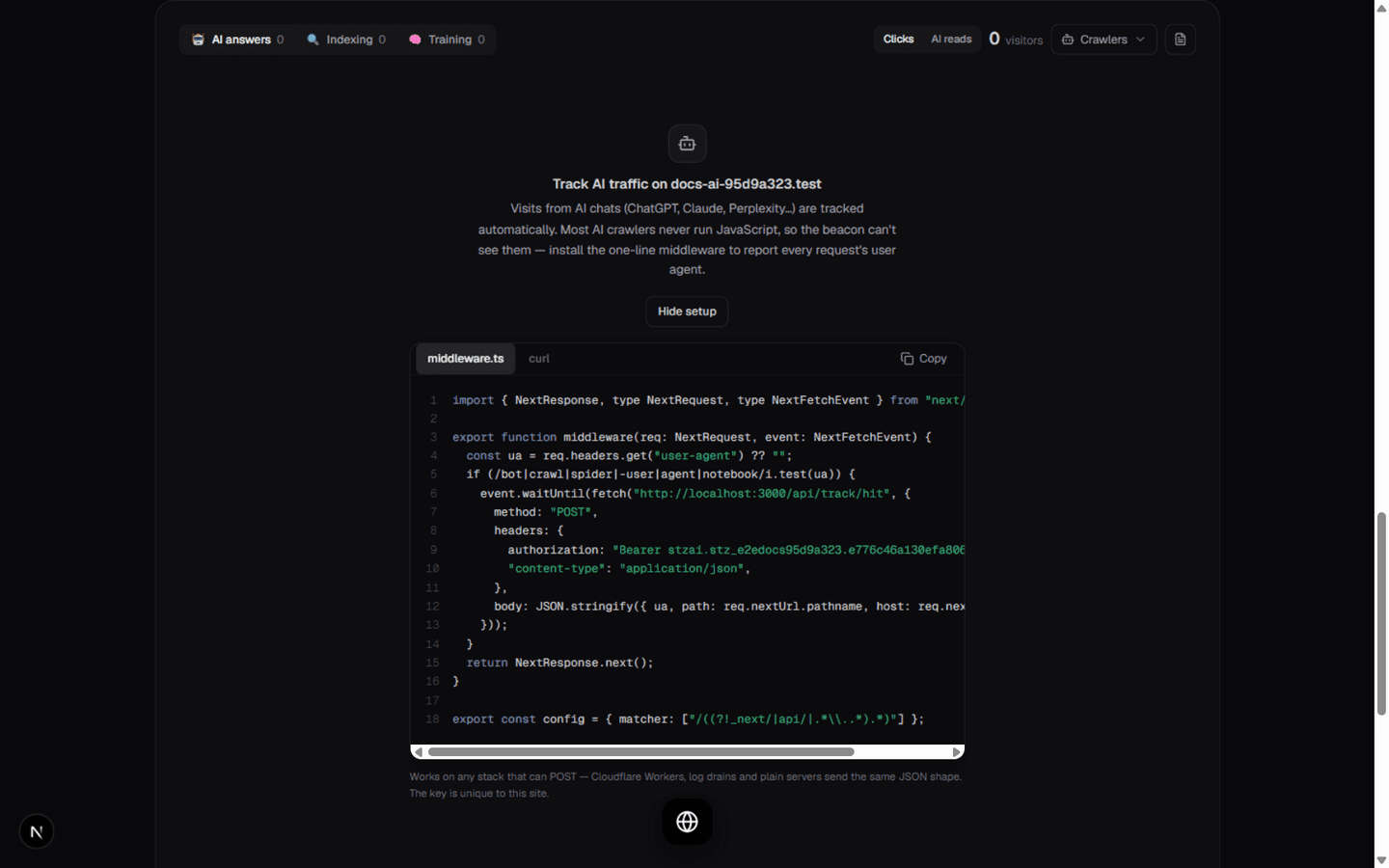
The setup state — copy the middleware from here; the key is already yours. - Add the middleware. For a Next.js site, paste this into
middleware.tsin your project root (replace the host and key with the ones from your snippet):Any stack that can POST works the same way — Cloudflare Workers, log drains and plain servers send the exact JSON shape1import { NextResponse, type NextRequest, type NextFetchEvent } from "next/server";23export function middleware(req: NextRequest, event: NextFetchEvent) {4 const ua = req.headers.get("user-agent") ?? "";5 if (/bot|crawl|spider|-user|agent|notebook/i.test(ua)) {6 event.waitUntil(fetch("https://YOUR-STATIZ-HOST/api/track/hit", {7 method: "POST",8 headers: {9 authorization: "Bearer stzai.<site-id>.<key>",10 "content-type": "application/json",11 },12 body: JSON.stringify({ ua, path: req.nextUrl.pathname, host: req.nextUrl.hostname }),13 }));14 }15 return NextResponse.next();16}1718export const config = { matcher: ["/((?!_next/|api/|.*\\..*).*)"] };{ ua, path, host }to/api/track/hitwith the same bearer key. - Verify it. Run the
curltab from the snippet — the response is{ "accepted": 1 }for a recognized crawler. Real traffic shows up within minutes: the crawler tabs display a Crawler tracking since date and start plotting. The pre-filter in the middleware is deliberately broad; statiz's own registry decides what is an AI crawler, so your copy never goes stale.
Read the graphs
Every tab plots one colored line per AI product over your date range. Hovering the graph shows each product's count per bucket; hovering a row in the list emphasizes its line and dims the rest.
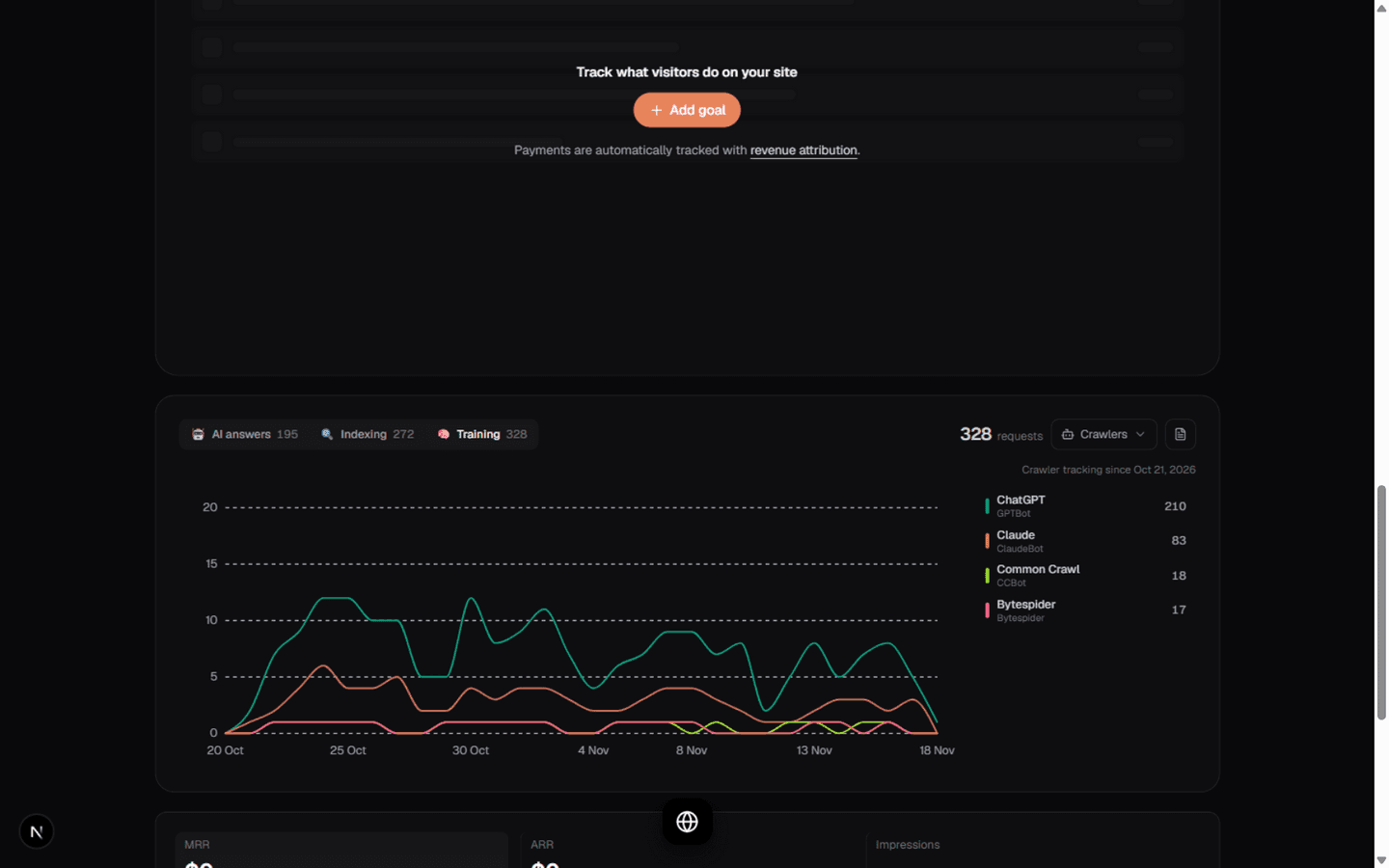
Two controls in the corner change how the graph groups:
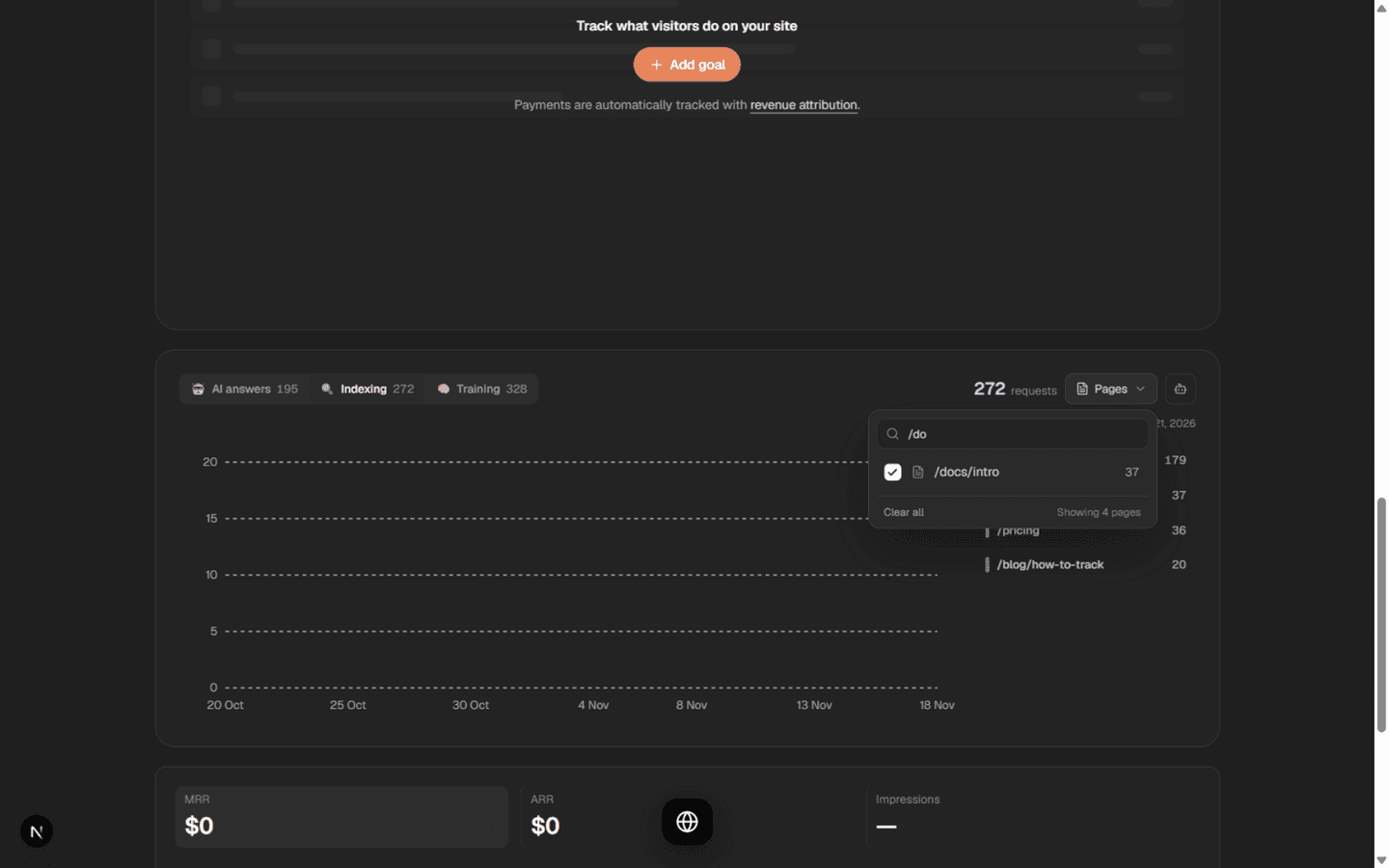
- The Crawlers / Pages pill opens a checkbox filter over the current grouping. Uncheck a crawler to remove its curve — isolate exactly the lines you care about. Clear all and All N reset the selection.
- The icon button next to it flips the grouping: “Grouped by crawlers — tap to group by pages instead”. Pages mode replots the graph per URL — which pages get crawled, indexed or read — with a search box in the filter dropdown for long page lists.
Which crawlers are recognized
statiz maintains a registry of AI agents and classifies every request by its user agent before anything is stored. The products you'll most often see:
- ChatGPT (OpenAI) — GPTBot trains, OAI-SearchBot indexes, ChatGPT-User fetches for a person.
- Claude (Anthropic) — ClaudeBot trains, Claude-SearchBot indexes, Claude-User fetches for a person.
- Perplexity — PerplexityBot indexes (not used for training, per their docs), Perplexity-User fetches.
- Gemini (Google) — appears as AI-chat clicks from
gemini.google.comand user fetches by Google-Agent. There is deliberately no Gemini line on the crawler tabs: Google trains Gemini via theGoogle-Extendedrobots.txt token, which never appears in any request log. - Also tracked: Meta (meta-externalagent, meta-webindexer), Amazon (Amazonbot, Amzn-SearchBot), Apple (Applebot), Mistral, DuckAssist, Common Crawl (CCBot), ByteDance (Bytespider), Grok, DeepSeek and the long tail.
Notes & caveats
- Exclusions apply. Paths you exclude in Settings → Exclusions are not reported by the middleware, and excluded IPs and hostnames are dropped at ingestion, same as human visits.
- Filters don't narrow crawlers. Dashboard filters describe visitors (country, device, browser). Crawlers have none of those attributes, so the Indexing and Training tabs show a note instead of silently-empty zeros while a filter is active. AI answers clicks honor every filter like the rest of your analytics.
- Query strings are dropped from reported paths —
/pricing?ref=xand/pricingare the same page. URLs can carry tokens; statiz keeps only the path. - Crawler history starts at install. Clicks are backfilled from stored referrers; crawler fetches were never recorded before the middleware existed, so Indexing and Training accrue from the day you set them up — the “tracking since” date says so honestly.
- A user agent is a claim, not proof. Anyone can send a GPTBot string. Your human stats are unaffected (spoofers never become visitors); treat crawler counts as self-reported. The reporting key is unique to your site — rotate it by rotating
APP_SECRET. - Privacy: statiz never stores visitor IPs, and crawler reports carry no IPs at all — only the user agent (kept for registry upkeep), path and timestamp.
- robots.txt still rules access. This is analytics, not access control — blocking GPTBot happens in your
robots.txtor firewall, not here.